Liquid-Crystal-Display (LCD)
The LCD lets you display more detailed information than the 7-Segment Display, allowing for a character display on the breadboard computer itself. When using it, you first have to call the initialization sequence. After that, data can be written and read fairly simple.
My implementation uses the 8-bit mode of the LCD, but note that it can also run in 4-bit mode if you wish to do so (although that would require a modification of the instructions).
Timing
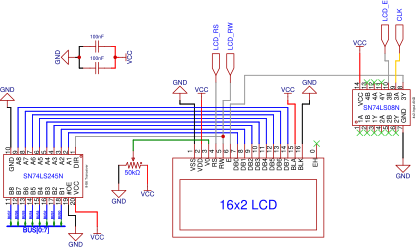
The timing diagram in the original datasheet of this LCD (HD44780) has pretty complicated timing requirements for reading and writing data to the CLD. I managed to make it work with a much easier circuit, which may lay a bit outside the official timing ranges provided by the datasheet, but is good enough for a hobby-project. It works reliable in my build, so I see no reason to over-complicate things here. This is the timing diagram i came up with (also take a look at the schematic for better understanding):
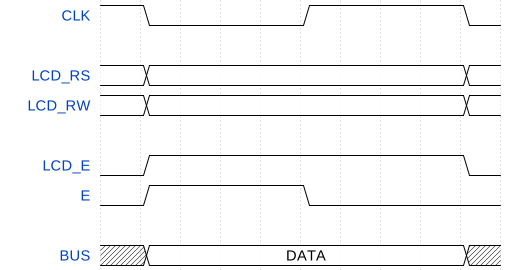
The data is actually read by the LCD at the falling edge of “E”, that’s why there are no race-conditions with LCD_RS and LCD_RW. If you took a look at the schematic, you will have probably noticed the 8-bit transceiver whose output is always enabled. Originally, that was part of an old design and I thought I could remove it. I don’t know why, but when I remove that transceiver, the LCD won’t display the characters accurately anymore. Although I’m not completely sure why this happens, I think that it has to do something with timing and reading the busy-bit from the LCD onto the bus. But for now, I will just keep it in the circuit as the LCD-module currently works completely fine.
A note about high CPU clock frequencies
The higher the CPU clock speed, the faster the instructions are executed. Up to a certain point, this is no problem for the LCD, as the instructions are still executed slower than the LCD can process the current request. But beyond this point, the CPU is too fast for the LCD and may send a new command to the LCD before it can finish the previous one. Additionally, some LCD-commands take way longer than others, i.e. the “clear display” command may take a few milliseconds to complete. The solution is to wait for the LCD to finish processing the current command and only after that sending new commands from the CPU to the LCD. You can do this by reading the busy-bit from the LCD, which is “1” while the LCD is busy processing the current command.
Initialization Sequence
Before you can write characters to the LCD or read data from it, you have to execute a sequence of specific commands in order to initialize the LCD. During initialization, only control- and write- commands are send, which means that all data is written into the CTRL-Register of the LCD (LCD_RS = 0, LCD_RW = 0). The datasheet suggests the following sequence of commands for initializing the LCD:
| DATA | Note |
|---|---|
| 0b00000001 | Optional: Clear the display |
| 0b00111000 | Function set: 8-bit mode, 5x8 dot display with two lines |
| 0b00001111 | Display on/off control: display on, cursor on, cursor blinking on |
| 0b00000110 | Entry mode set: move cursor from left to right, no display shift |
After executing these commands in order, the LCD is initialized and ready to receive data/characters to be displayed.
A “lcd_init” function is included in the “common.asm” file in the asm-folder, which executes this exact sequence of commands in order. It also uses the busy-flag to check if the LCD is ready to receive new commands.
Schematic